
Introduction to vizzy
vizzy is a native macOS app that renders diagrams from Markdown files. It supports architecture, sequence, flow, timeline, and mind-map diagrams, among others. The files can live anywhere, often next to your code, and the app reloads them as they change.
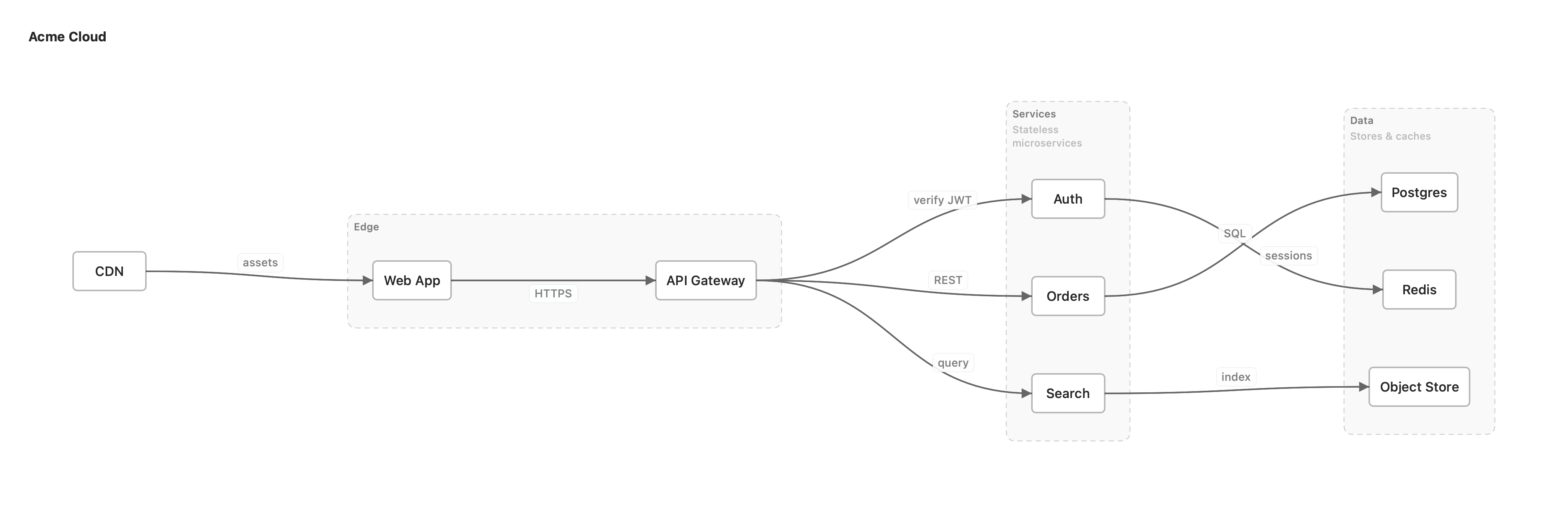
Where diagrams live
Section titled “Where diagrams live”A diagram is a plain *.vizzy.md Markdown file. Keep one topic per file. The file can live
in your code repo, a docs folder, or on its own. A common layout is a vizzy/ folder at the
repo root:
vizzy/ architecture.vizzy.md # high-level service / component map <flow>.vizzy.md # one file per important flow (auth, checkout, …) vizzy.config # optional: re-theme the standard color palette assets/ # optional: images and icons referenced by diagramsThis layout is only a convention. There is no required folder name and no git repo needed. One file is one page: prose plus one or more diagrams, shown top to bottom on a pannable canvas.
Opening files in Vizzy
Section titled “Opening files in Vizzy”Vizzy organizes files into workspaces. A workspace is a named set of folders and files to watch. You add what you want to see, and Vizzy reloads it as it changes:
- A single file: File ▸ Open… (⌘O), drag a
.vizzy.mdonto the window, or runvizzy path/to/diagram.vizzy.mdin the terminal. - A whole folder: File ▸ Add Folder…, drag it in, or run
vizzy ~/Code/myproject. Vizzy scans the folder recursively for*.vizzy.mdfiles. Novizzy/folder or git repo is required.
On first launch Vizzy creates a Default workspace from common dev folders it finds, such
as ~/Code and ~/Developer. After that, you choose what each workspace watches.
How a file is rendered
Section titled “How a file is rendered”A *.vizzy.md file is plain GitHub-Flavored Markdown:
- Prose renders as annotation cards. Full Markdown is supported: headings, lists, code, and bold.
- Fenced code blocks render as diagrams. A
mermaidfence holds standard Mermaid. Avizzyfence holds vizzy’s own additions: architecture maps and annotations.
---title: Auth architecturecreated: 2026-06-16lastEdited: 2026-06-16---
The login path, end to end.
```mermaidflowchart LR  web[Web] --> api[API] --> db[(Postgres)]```
```vizzynote api: rate limited 5/minhint api: [Why?]("Token bucket, **5 req/min**.")```
Next steps
Section titled “Next steps”- Set up an agent: let a coding agent write and maintain your diagrams.
- File format: frontmatter and the two kinds of fence.
- Diagram types: sequence, flowchart, architecture, and more.
- Present mode: step through a file’s diagrams full-screen as animated slides.
- Publish to the web: share a diagram or a whole workspace at a usevizzy.com link.
- Rendering to images: export diagrams as PNG, JPEG, HEIC, or AVIF with the
vizzyCLI.