
Diagram annotations in vizzy
Annotations are numbered pins you drop anywhere on a diagram to leave a comment, like
marking up a screenshot in a design review. They are for discussing a diagram. They are
separate from the desc/note/hint directives, which are part
of the diagram’s source.
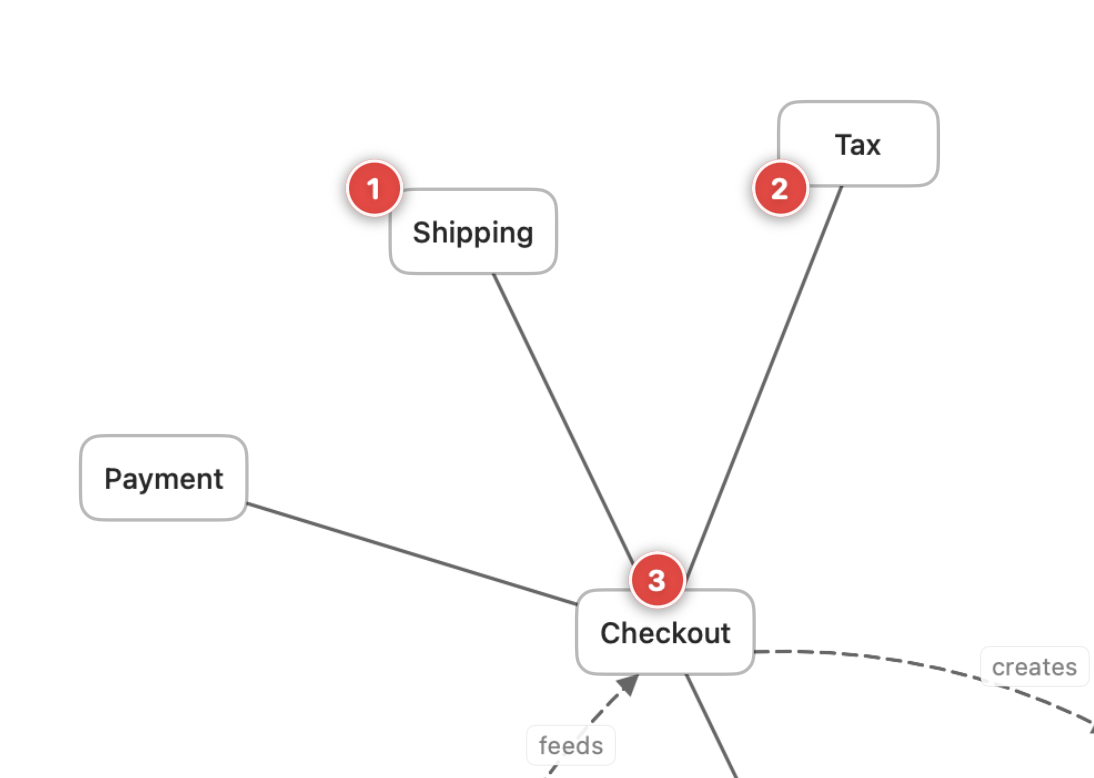
Adding a pin
Section titled “Adding a pin”Click the comment button (the +-bubble icon) in the document toolbar to enter pin
mode, then click anywhere on the canvas to drop a numbered pin. A small popover opens where
you type the comment.
Pins are anchored in the diagram’s own coordinate space, so they stay attached to the spot you placed them even as the diagram is edited and laid out again.
Comment on prose
Section titled “Comment on prose”You can also comment directly on the words in a prose block, without pin mode. Select some text and a small Add comment bubble appears. Click it to drop a numbered pin anchored to that passage. The quoted words are highlighted in yellow.
A prose comment is anchored to its quote and the text around it, not to a point on the canvas, so it survives edits elsewhere in the file. The highlight stays on the right words as the rest of the document changes. Open the pin and it shows the passage it is attached to. If that text is later deleted or rewritten so the quote no longer matches, the comment is flagged as Original text changed instead of pointing at the wrong place.
Where pins are stored
Section titled “Where pins are stored”Pins are saved to a sidecar file next to the .vizzy.md, so they persist across restarts
without changing the diagram source. Because they live beside the file rather than inside
it, the rendered diagram and the CLI render output stay clean. Pins are a
review layer, not part of the published image.
Editing a prose block inline
Section titled “Editing a prose block inline”Double-click a prose block to edit its Markdown on the canvas. The block turns into an
editor. Click away or press ⌘-Return to save your change, or Esc to cancel. Unlike
a comment, this edits the .vizzy.md file itself.