
Colors and theming in vizzy
Styling is optional. Diagrams render well with none. When you do color a node, use a
standard color name rather than a raw #hex. Names stay on-theme, and a single
vizzy.config can retheme the whole repo at once. Do not invent custom tokens.
The palette
Section titled “The palette”red orange yellow green mint teal cyanblue indigo purple pink brown gray black whiteThe palette also includes primary, secondary, and accent. A raw #hex works anywhere
a name does, but vizzy lint suggests a name instead. If you need a specific shade, define
it once in vizzy.config and reference it by name.
Re-theming a whole repo
Section titled “Re-theming a whole repo”To restyle every diagram at once, add an optional vizzy/vizzy.config that remaps what
the names mean. The diagrams keep using plain names:
# vizzy/vizzy.config: optional palette overrides (name = #hex or color name)red = #E5484Dblue = #0A84FFgreen = #30A46CNow every stroke:red / fill:red uses the new red. Lines starting with # are comments.
Unknown or malformed lines are ignored. With no config file, the built-in palette is used.
How a color name resolves
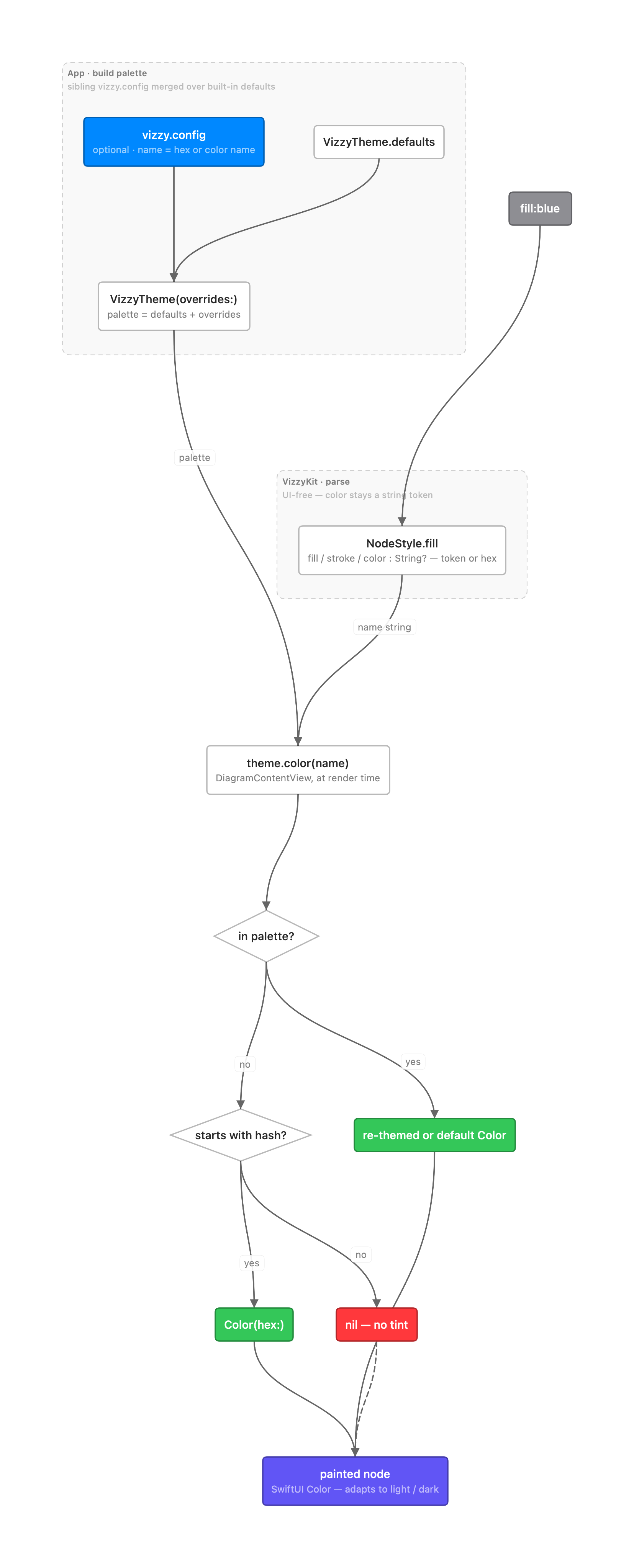
Section titled “How a color name resolves”A color stays a plain name until it is drawn. VizzyKit parses the diagram and keeps
fill / stroke / color as unresolved strings on each node. The app builds a palette by
merging your vizzy.config over the built-in defaults, then resolves each name at render
time. The order is: config override, then built-in default, then raw #hex, then none.
The final SwiftUI color adapts to light and dark mode on its own.
Assets
Section titled “Assets”Images are optional. You can reference files from vizzy/assets/, but no diagram needs
them.
To turn a diagram into an image for a README or web page, use the
vizzy CLI. It renders each diagram to a PNG in vizzy/assets/.