
Data table diagrams
Use a data table for reference data: anything that is naturally rows and columns. There is no special keyword. A standard GitHub-Flavored Markdown table renders as a table card.
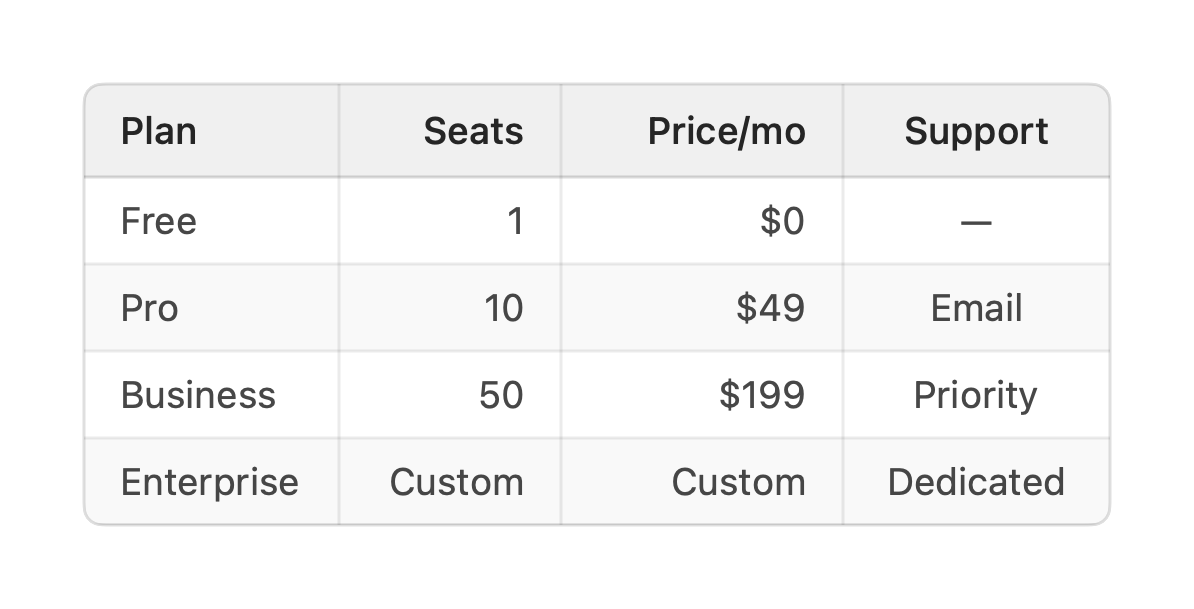
| Plan | Seats | Price/mo | Support || ---------- | -----: | -------: | :-------: || Free | 1 | $0 | — || Pro | 10 | $49 | Email || Business | 50 | $199 | Priority || Enterprise | Custom | Custom | Dedicated |A header row, a delimiter row, then the data rows. Leading and trailing pipes are optional.
\| escapes a literal pipe inside a cell.
- Alignment comes from the delimiter row:
---(default),:---(left),:---:(center),---:(right). Above, the numeric columns are right-aligned andSupportis centered. - Column type is inferred from the cells. Numeric columns right-align and use tabular figures automatically.
- Nothing is fatal. A short row is padded with empty cells and a long row is truncated to the header’s column count, so a table always renders.
Titling a table
Section titled “Titling a table”A table has no title line of its own. To give it a heading, add a
vizzy fence directly below it. The id-less title and
desc forms label the card as a whole. title is the heading and desc is a subtitle
beneath it:
| Month | Region | Revenue | Deals | Close % || ----- | ------ | ------: | ----: | ------: || Jan   | EMEA   |   5,000 |    42 |     31% || Feb   | EMEA   |   6,000 |    51 |     34% |
```vizzytitle Q2 revenue by regiondesc Monthly revenue, deals closed, and close rate. Sortable and filterable.```
The fence binds to the block directly above it, so place it right after the table it describes, not at the bottom of a file that holds several diagrams.
Conditional cell colors
Section titled “Conditional cell colors”cellstyle rules colour body cells by content, so enums, tags, and statuses stand out
without styling rows one by one. Because they match content rather than row numbers, they
keep working when rows are added, reordered, sorted, or filtered:
| Service | Status    | Latency || ------- | --------- | ------: || api     | Done      |     250 || web     | In Review |      45 || db      | Blocked   |     120 |
```vizzycellstyle Status = Done: greencellstyle Status = Blocked: redcellstyle Status contains review: bluecellstyle Latency > 200: orangecellstyle Latency < 50: mint```
The rule form is cellstyle <header> <op> <value>: <color>:
<header>names the column by its header text. Case-insensitive, spaces allowed.<op>is=(exact match) orcontains(substring), both case-insensitive, or>/<for numbers. Numeric comparisons parse cells the way sorting does ($1,200,85%, and+3all compare as numbers). A cell that is not a number never matches.<color>is a palette token (green,red,blue, …) or a#hexvalue, drawn as a light wash behind the matching cell in both light and dark mode.
Per cell, the first matching rule wins in fence order, so put the most specific rule
first. Quote a value that contains a colon: cellstyle Time = "12:30": mint.
Pinning column widths
Section titled “Pinning column widths”tablewidths sets fixed pixel widths per column instead of sizing them automatically:
| Service | Status    | Latency || ------- | --------- | ------: || api     | Done      |     250 || web     | In Review |      45 || db      | Blocked   |     120 |
```vizzytablewidths 200 120 100```
The rule form is tablewidths <w1> <w2> …, with values in source-column order:
<w1> <w2> …: a width in pixels for each column, left to right.- Extra values beyond the column count are ignored.
- Missing values leave the remaining columns auto-sized.