
Architecture diagrams
Architecture diagrams are vizzy’s own diagram type. Use them to show which services exist
and what each one sends to the others. Write a standalone vizzy block whose first line
starts with architecture:
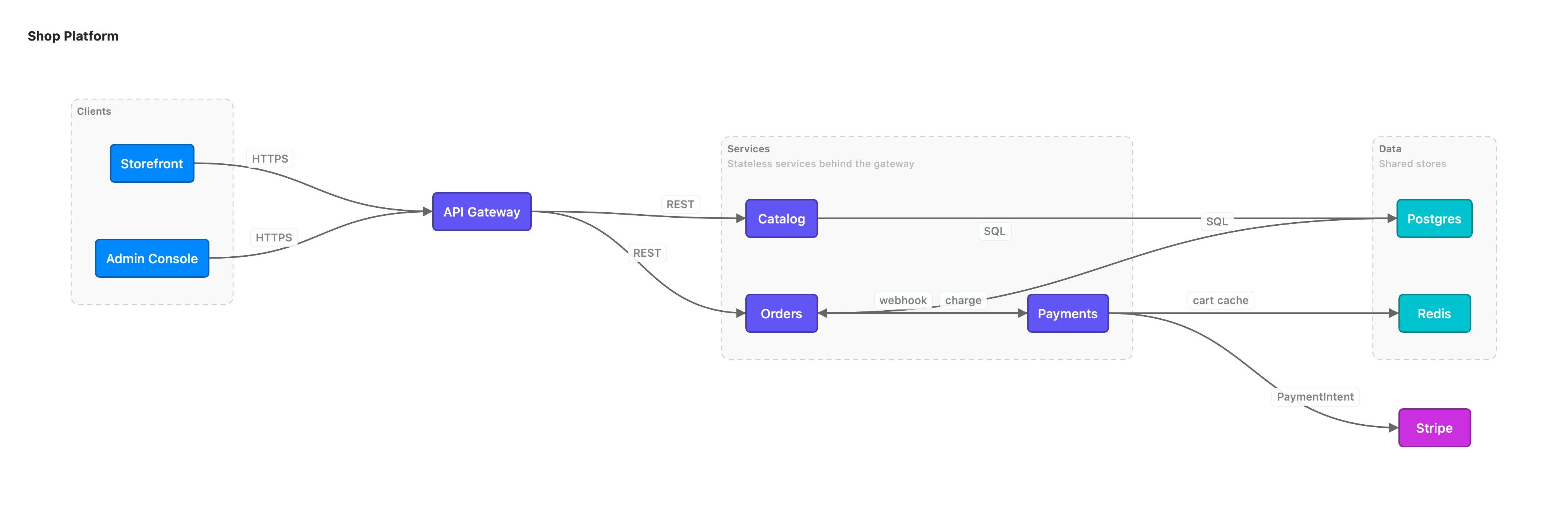
architecture LR Shop Platformgroup client Clientsservice web Storefront in clientservice admin Admin Console in clientservice gw API Gatewaygroup svc Servicesservice catalog Catalog in svcservice orders Orders in svcservice pay Payments in svcgroup data Dataservice pg Postgres in dataservice redis Redis in dataservice stripe Stripeweb -> gw : HTTPSadmin -> gw : HTTPSgw -> catalog : RESTgw -> orders : RESTcatalog -> pg : SQLorders -> pg : SQLorders -> redis : cart cacheorders -> pay : chargepay <-> stripe : PaymentIntentpay --> orders : webhookdesc svc: Stateless services behind the gatewaydesc data: Shared storeshint pay: [Payments](payments.md)hint svc: [Services]("Stateless, autoscaled 2-10 pods")hint orders->pay: [Retry policy]("Exponential backoff, 3 attempts")service <id> [Label] [in <group>]: a box.nodeis a synonym forservice.group <id> [Label]: a container. Services that follow within <group>join it.A -> B : payload: an edge.<->is bidirectional and-->is dashed. The text after:renders as a chip on the edge.desc <id>: text: a description under a service’s label, or under a group’s title (the box grows to fit). Use it to title a whole section. Ids may be referenced before they are declared, so adescline can sit anywhere in the block.hint <id>: [Title](dest): a click-to-open info badge on a service, a group, or an edge (written asA->B). Likedesc, it can reference an id before it is declared.